How to Check Transfer Details Before Paying a Peptide Shop

Pay only using the transfer details issued for your order. If bank transfer appears at checkout, complete your order first; the payment details will follow. Before paying a peptide shop by bank transfer, match the payee and reference to the instructions. These checks help you make a bank transfer peptide shop payment carefully.
Pause before sending money. A mistyped account detail or missing reference can make a payment harder to trace. When choosing a bank transfer peptide shop, check that the payment details relate to your current order, not an earlier purchase.
This guide explains how to check transfer details, make the payment and keep a useful record. It also covers how to tell whether bank transfer is offered at checkout, what to expect from UK transfers and why international transfers may take longer. Follow the steps in order, using the instructions provided for your specific purchase.
Key Takeaways
- Match the payee, account details and payment reference to the instructions for your order before sending money.
- Keep your payment receipt and order details together so you can trace the transfer if needed.
- Look for the bank transfer option during checkout; the payment instructions follow the completed order.
- Allow for the transfer route to affect arrival time, especially when an international wire is involved.
- Read the direct payment instructions carefully, including the required currency and bank identifiers.
Checking transfer details and keeping the receipt
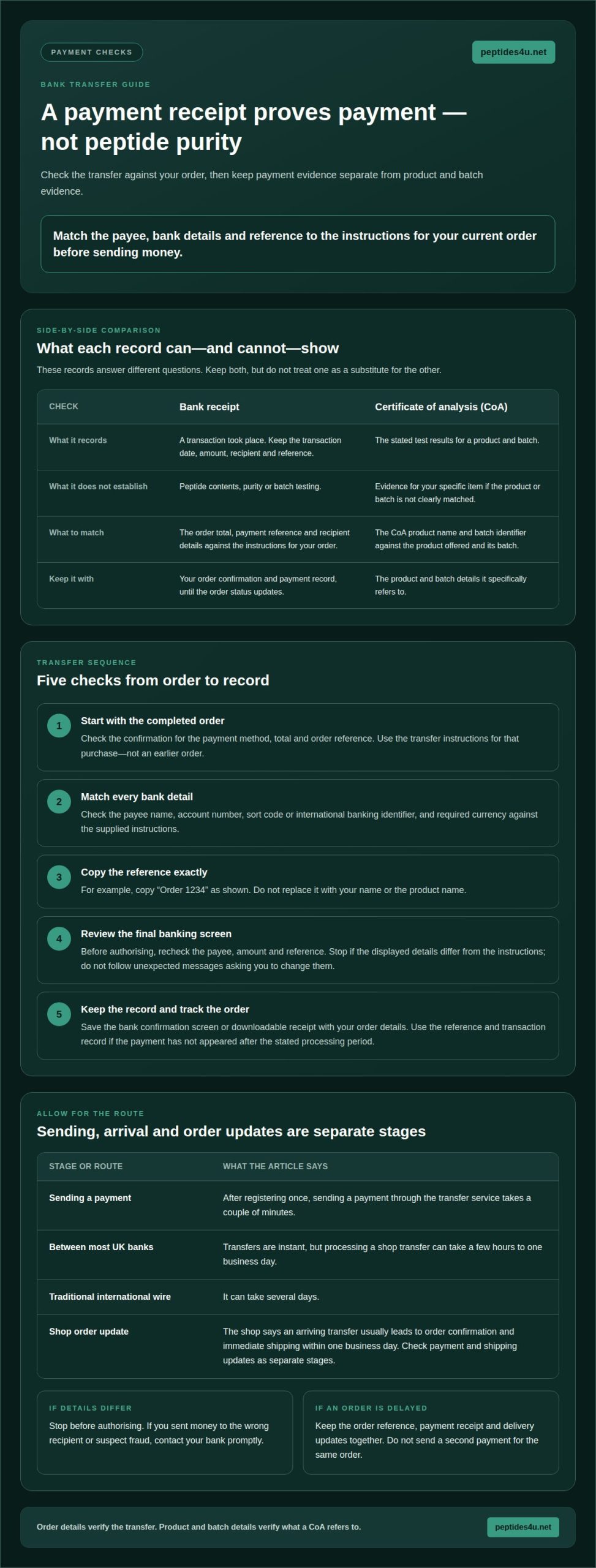
To check peptide purity, request a certificate of analysis (CoA) for the specific product and batch. Match its product name and batch identifier to the item offered; a transfer receipt confirms payment, not purity or batch testing.
- Start with the completed order. Open the checkout confirmation and locate the payment method, total and order reference. Compare these with the transfer instructions shown for that purchase. For example, a reference such as “Order 1234” must be copied exactly, not replaced with your name or product name.
- Match each bank detail character by character. Check the payee name, account number, sort code or international banking identifier, and currency against the supplied instructions. Use the details for your own order, not saved details from an older purchase. A mistyped digit can send money to the wrong account.
- Open your banking app and enter the details carefully. Review the payee, amount and reference on the final screen before authorising payment. If the displayed name or account details differ from the instructions, stop. Don’t change the details based on an unexpected message or a separate discount offer.
- Keep the order confirmation and payment receipt together. Save the bank’s confirmation screen or downloadable receipt, then retain the transaction date, amount, recipient and reference. A screenshot can help, but keep the full payment record where possible. Avoid sharing unrelated account balances or other private banking information.
- Use the reference to track the transfer. A payment may take time to reach the recipient’s bank, depending on the route. Keep the receipt until your order status updates. If the payment has not appeared after the stated processing period, use the order reference and transaction record to identify it.
- Know what an Open Banking payment means. Open Banking was introduced in the UK in 2018, and more than 11 million UK consumers use Open Banking services every month. It can connect a payment service with your bank, but still review the payee, amount and approval screen before authorising.
- Keep payment evidence separate from product evidence. A receipt shows that a transaction took place; it doesn’t establish peptide contents. For a certificate of analysis, compare the batch identifier with the product batch and read the stated test results. A document without a clear product or batch match is not evidence for that specific item.
Paying for peptide orders by bank transfer
Use the order-specific bank details and reference, then check payment status against your order. Follow these steps before authorising a transfer.
-
Verify the shop before paying
Check the shop’s trading name, product information, payment instructions and order confirmation. Make sure your bank’s payee name matches the supplied details. Before paying, compare the bank transfer peptide shop’s information with your order record. A professional-looking page alone doesn’t establish legitimacy. Stop if a separate message asks you to use different bank details or an unrelated reference.
-
Assess transfer safety and timing
Review the recipient and amount before approving payment in your banking app. Transfers between most UK banks are instant, but processing a shop transfer can take a few hours to one business day. Traditional international wire transfers can take several days. Don’t assume an authorised transfer can be reversed; contact your bank promptly if you sent money to the wrong recipient or suspect fraud.
- Check the payment methods shown at checkout. Options vary between shops; a card or payment service might be available alongside transfer, but use only a method displayed for your order. Checkout shows which methods you can select before paying.
- Keep legal questions separate from payment instructions. UK rules for buying or importing research peptides depend on the substance, intended use and import circumstances. Check the rules that apply to the specific product and route before ordering; a seller’s label isn’t a legal determination.
- Read the intended-use wording before purchase. A research-use label doesn’t establish that a peptide is authorised for human use in the UK. A bank receipt, product description or certificate doesn’t establish this either.
- Compare the full order total, not just the listed product price. Peptide prices and delivery costs vary by product, quantity, delivery option and destination. Use the amount displayed at checkout rather than a general estimate for another order.
- Consider product and transaction risks together. An online listing cannot, by itself, prove product identity, quality or suitability. Before sending money, check that the bank transfer peptide shop’s order details and payment recipient match.
- If an order doesn’t arrive, gather the order reference, payment receipt and delivery updates. Contact the shop through its stated order channel. If you suspect fraud, contact your bank promptly and keep the transaction record. Don’t send a second payment for the same order.
The shop says an arriving bank transfer usually leads to order confirmation and immediate shipping within one business day. After registering once, sending a payment through the transfer service takes a couple of minutes. These are separate steps: the time needed to send a payment is not the same as the time for the transfer to arrive or the order to be confirmed.
Check the order status against the relevant confirmation rather than treating payment as confirmation of dispatch. If the expected update is absent, use the shop’s stated order channel and keep the transaction record with your order details. Check payment and shipping updates as separate stages.
Bank transfer availability
Use checkout to see whether bank transfer is offered for your order. The available payment methods are those shown before you place it.
- Open checkout after adding the items you intend to order. Review the payment methods shown. If bank transfer appears, select it and follow the instructions. If it doesn’t, don’t assume you can pay using details from an earlier order.
- Check the order summary before choosing a payment method. Confirm that the listed products, quantities, delivery option and total match your selections. If a discount appears, check that the displayed total reflects it. This gives you a clear amount to compare with the payment instructions after placing your order.
- Select bank transfer only when checkout presents it as an option. Shops can offer different payment methods, so don’t rely on a general guide or an old confirmation email. The checkout for your current order is the practical way to see whether transfer is available.
- Complete the order using the checkout’s stated process. If you select bank transfer, the payment details are sent after the order is completed. Keep the order confirmation and instructions together, so you can match the reference and amount without confusing them with another purchase.
- Read the wording beside each payment method. A banking app may open as part of a payment flow, or checkout may provide instructions for a separate transfer. Follow the route shown. Don’t enter card details unless checkout offers card payment and you choose it.
- Look for a confirmation email or order confirmation page after placing your order. Check that it records the correct order and selected payment method. If you chose transfer, use the details issued for that order rather than entering bank details found elsewhere.
- If transfer is unavailable, pause before paying. Don’t substitute another method or send a transfer without order-specific instructions. Return to the checkout choices and select an option that is actually displayed. This helps prevent a payment that cannot readily be matched to your order.
- Keep payment method and dispatch expectations separate. Choosing bank transfer records how you intend to pay; it doesn’t confirm that payment has arrived or that an order has been dispatched. Use the order status and confirmation messages to follow these separate stages.
Direct bank transfer instructions
Use the payment instructions issued for your order. Follow each field exactly, including currency and bank identifier.
- Open your order’s payment instructions and identify the requested route. A direct bank transfer may involve entering the recipient and payment details in your banking service. Keep the order confirmation beside you. Don’t use bank details saved from a previous purchase, as instructions can differ between orders.
- Check the currency before entering an amount. The stated instructions require payment in euros (EUR), with the transfer service converting from your local currency. For a UK account, review the conversion shown by your banking service before approving. Make sure the amount and currency match the order instructions.
- Copy the beneficiary name exactly as displayed. Enter the bank identifier exactly as shown in your order’s payment instructions. Treat the bank name and identifier as separate fields. Don’t substitute a familiar UK sort code or account number when the instructions call for international bank details.
- Enter the payment reference exactly as provided. It connects your transfer with the relevant order. Avoid adding extra words, changing its format or using a product name instead. If the banking form limits the reference field, preserve the identifying characters and follow the payment instructions.
- Review the complete transfer before authorising it. Compare the recipient, bank identifier, currency, amount and reference against the order instructions. Check every field for typing errors. A manual transfer depends on the details you enter, so correct any mistake before confirming.
- Read the banking service’s confirmation screen carefully. Check the amount being sent and any conversion displayed for euros (EUR). Your bank’s conversion presentation may differ from the order’s currency display. Don’t approve the payment if the recipient or currency shown conflicts with the instructions.
- Save the payment confirmation after sending. Keep the transaction record with the order confirmation and reference. This puts the recipient, amount, date and payment identifier in one place. Use the record if you need to follow up on the order or trace the transfer.
- Use your own banking preferences only if they don’t alter the required details. A saved payee can reduce typing, for example, but compare its bank identifier and beneficiary name with the current instructions. Don’t rely on an old template if the order names a different recipient or currency.
Are bank transfers a safe way to pay an online peptide shop in the UK?
- Keep payment security separate from product confidence. A bank transfer moves money to a recipient; it doesn’t prove a peptide’s identity, quality or suitability. Treat these as separate checks. A successful payment confirms a transaction, not the contents of a vial or the accuracy of a product description.
- Check the recipient before authorising payment. Compare the payee name and bank details with the instructions for your order. Read the final approval screen in your banking app. Stop if the displayed recipient differs, or if an unexpected message asks you to switch account details. A familiar shop name in an email isn’t enough to validate changed instructions.
- Use a payment route you understand. Open Banking was introduced in the UK in 2018. More than 11 million UK consumers use Open Banking services every month. Whether you use that route or a manual transfer, check the recipient, amount and approval request before authorising. Don’t approve a request you didn’t initiate.
- Consider recovery before sending. A bank transfer is not the same as paying by card, and an authorised payment may be difficult to recover. If you spot an error or suspect fraud, contact your bank promptly through its usual channel. Keep the transaction reference and order confirmation ready to explain what happened.
- Assess product claims separately from payment details. A certificate of analysis should identify the relevant product and batch. Compare those identifiers with the item offered and read what the document reports. A bank receipt, polished website or fast payment confirmation cannot replace evidence about the specific batch.
- Keep the decision record together. Save the order confirmation, payment receipt and any product documents in one place. This gives you a clear record of what you ordered, whom you paid and which evidence accompanied the listing. Avoid sharing full banking screenshots that expose unrelated balances or transactions.
- Choose whether to proceed only after those checks. If the recipient, order record or product evidence conflicts, pause rather than sending money. For a purchase, review the peptide products available and compare the listing with the details you need before deciding.
Peptides4u: Plumas SereneQ
Peptides4u offers Plumas SereneQ. If you’ve decided to consider this product, review its listing and the order details before paying. Check that the item selected at checkout matches your order confirmation, then follow the payment instructions issued for that purchase.
Keep the order reference and payment receipt together. They help you track which order a transfer relates to. Use the product information provided with the listing to understand what you’re selecting; payment confirmation does not establish product purity or suitability.
For a straightforward next step, visit peptides4u.net to view Plumas SereneQ.
Make your next payment decision with care
A bank transfer to a peptide shop is a practical choice only when the product, order and payment route are clear to you. Treat payment as one part of the decision, not proof of what a product contains. Keep your own records and make sure the order details match before authorising any future transfer.
Peptides4u offers Plumas SereneQ and premium research vials. Review the product information and select only the item that fits your requirements. Take time to read the checkout details and payment instructions for your order. A deliberate choice now helps keep the next steps straightforward.
If you have a question about the available products or placing an order, contact Peptides4u with your question. Take the next step when you’re ready, with the details in front of you.
Frequently Asked Questions
Which UK peptide shops accept bank transfer payments?
Peptides4u lists bank transfer as a payment method for its online orders. It also lists cryptocurrency, so customers can see both options when reviewing the shop’s payment information. Orders are confirmed on WhatsApp. Before paying, make sure the payment option and order details apply to your purchase, and retain the confirmation so you can match the payment to the correct order.
What are typical UK prices and delivery costs for peptides?
Peptide prices and delivery costs vary by product, quantity, delivery option and destination. Check the total shown at checkout for your order.