Peptide Shop Cryptocurrency: Payment Benefits and Buying Crypto

Some peptide shops accept cryptocurrency, and some take only crypto. A peptide shop cryptocurrency payment starts with buying a supported coin, then sending the requested amount to the wallet shown at checkout. USDT on the TRC-20 network and USDC are options for keeping the payment value steadier.
Paying with cryptocurrency can feel unfamiliar if you usually use a card. The key is to match the coin and network shown at checkout: sending funds through the wrong network can cause problems. This guide explains how cryptocurrency payments work at a peptide shop and what to check before paying in the UK.
You’ll see how to choose a crypto app, complete identity checks, buy crypto and make a payment. Signing up to an app and verifying your identity usually takes a few minutes. We’ll also cover what to check before sending funds, including the payment amount, wallet address and network. The aim is a clear process, with fewer surprises between checkout and payment confirmation.
Key Takeaways
- Crypto can give peptide shops another way to accept payments, but the practical benefits depend on how the payment is set up.
- Some online peptide suppliers accept cryptocurrency only, so identify the accepted coin and network before checkout.
- Learn how to buy crypto for an online payment and avoid common transfer errors by matching the checkout details carefully.
- Payment fees and refund arrangements can vary. Understand the total shown at checkout and the shop’s cancellation terms before sending funds.
- Explore Plumas SereneQ at Peptides4u if you’re looking for this offering as your next step.
Benefits of crypto payments for peptide ecommerce
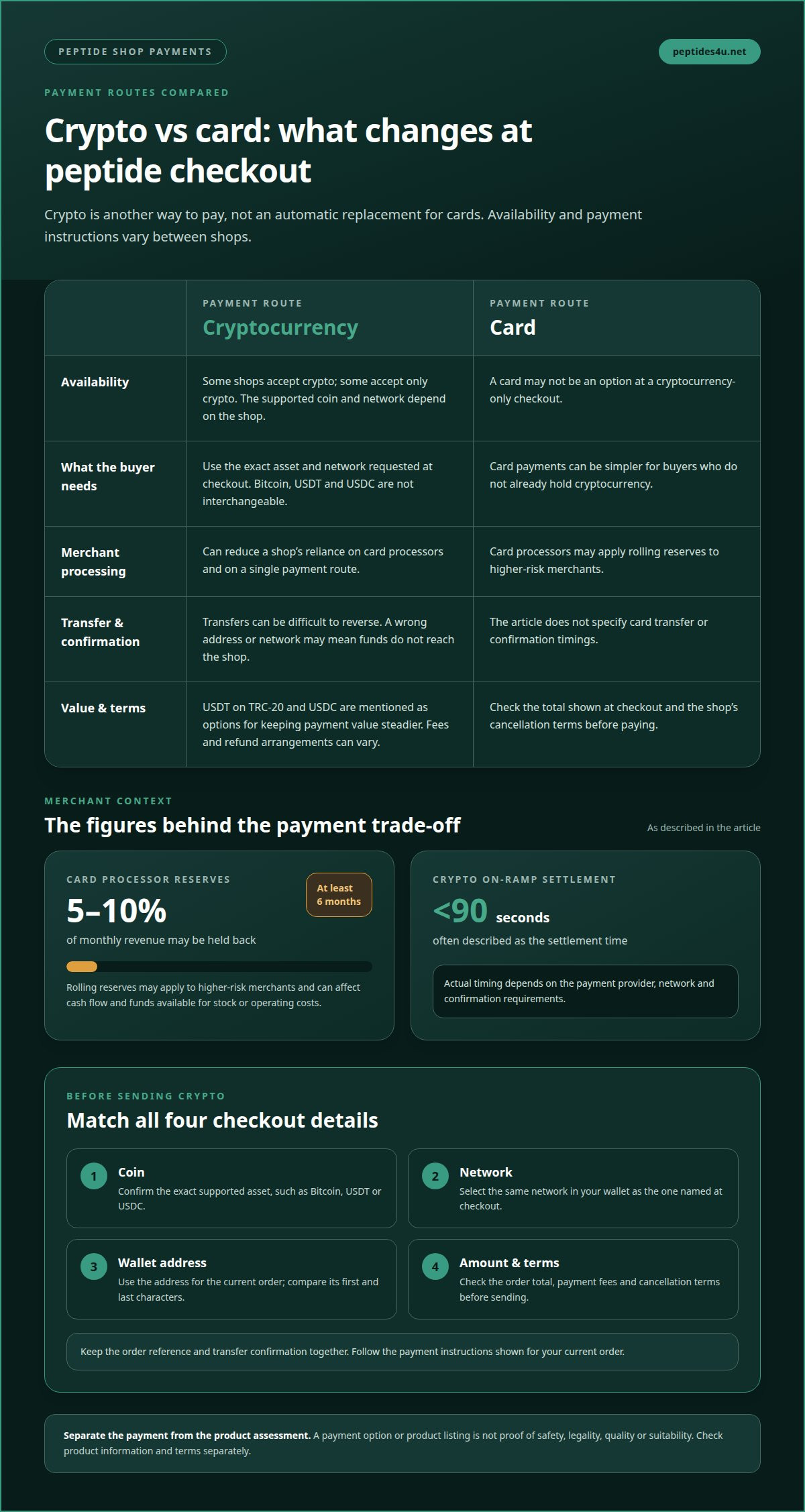
Cryptocurrency gives peptide ecommerce businesses another way to take online payments. It can reduce reliance on card processors, which may apply rolling reserves to higher-risk merchants. Those reserves can hold back 5-10% of monthly revenue, typically for at least 6 months. For a shop, that can affect cash flow and funds available for stock or operating costs.
Crypto can also shorten payment settlement. Crypto on-ramp payment settlement is often described as taking less than 90 seconds. The actual process depends on the payment provider, network and confirmation requirements. For customers, the main benefit is another checkout option. For merchants, it can mean less dependence on a single card-processing route.
Bitcoin is one possible payment method, but it isn’t interchangeable with every other coin. A shop must support Bitcoin specifically, and the customer must send it using the requested network. Card payments remain familiar and can be simpler for buyers who don’t already hold cryptocurrency. Crypto is an alternative, not an automatic replacement for cards.
For a WooCommerce shop, cryptocurrency payments usually connect checkout to a payment gateway or wallet service. The integration can create a payment request, display the amount and network, then update the order after payment is detected. The shop must configure the currencies it accepts and how payment statuses are handled. WooCommerce itself doesn’t make every cryptocurrency available by default.
Sending crypto to a payment wallet requires careful matching. At checkout, read the coin, network, wallet address and amount. In your wallet or exchange app, select the same coin and network, then paste or scan the address. Compare its first and last characters before sending. A transfer to the wrong address or network may not reach the shop.
A crypto on-ramp lets you buy cryptocurrency using a conventional payment method. The provider receives your payment, converts it into the selected crypto and sends it to your wallet or a checkout address. Fees may come from the on-ramp or its payment provider. Before confirming, check that the checkout specifies the asset and network you need.
Accepting cryptocurrency doesn’t establish whether a product is suitable for any particular purpose or whether its supply is lawful. Some online peptide products are supplied strictly as laboratory research chemicals and are not for human or veterinary use. Don’t treat a payment option or product listing as proof of suitability, quality or lawful supply.
When assessing a UK supplier, look for batch-specific testing information, clear product descriptions, identifiable business details and consistent customer feedback. Read the terms before paying. Cryptocurrency transfers can be difficult to reverse, so check the wallet details and order total before sending. Payment method alone doesn’t determine whether a shop ships across the UK.
A payment option or product listing isn’t proof of safety, legality or quality. Check the product information and terms separately from the payment instructions.
Which UK peptide shops accept cryptocurrency payments?
Some online peptide suppliers accept only cryptocurrency. UK shoppers may therefore find that card details aren’t an option at checkout. Payment methods vary between shops, so look for a cryptocurrency symbol, payment note or checkout option before preparing a transfer. A listing that mentions Bitcoin, for example, doesn’t automatically mean it accepts USDT or another coin.
Check the shop’s payment information before adding products to your basket. Look for the exact coin and network it supports. Bitcoin and USDT are separate assets, and USDT can operate on different networks. A payment instruction for USDT on TRC-20 won’t match a Bitcoin transfer. The checkout details determine what the shop can receive.
A peptide shop cryptocurrency payment option can mean Bitcoin-only checkout or support for several assets. Check whether the shop names Ethereum, Litecoin, USDT or USDC. Don’t assume that a familiar coin is accepted simply because it appears on other payment pages. The exact list at checkout is what matters.
Some shops use a payment gateway to create a wallet address or payment request for each order. Others may provide wallet details directly. Either way, follow the instructions shown for your current order. An address copied from an earlier order may not be suitable for a new payment. Use the address and amount displayed at the current checkout.
Payment acceptance can also depend on the checkout stage. A shop may mention cryptocurrency before checkout, then specify a particular coin or network when the order is created. Use the final payment screen as your reference. Confirm that the selected asset matches your wallet before transferring funds.
Use these checks to compare payment information between shops:
- Find the supported coin, such as Bitcoin, USDT or USDC.
- Match the named network to the network selected in your wallet.
- Read the payment and cancellation terms before placing the order.
- Keep the order reference and transfer confirmation together.
A cryptocurrency-only checkout can suit someone who already holds the requested asset. It adds an extra step for a shopper who needs to buy crypto first. If a shop accepts cards as well, that may provide another route. The choice depends on which payment methods the shop presents, not simply the product category.
Don’t treat crypto acceptance as proof of product quality or suitability. Payment method and product information are separate matters. Read the product descriptions and terms, then check that the requested payment details match your order. A fast transfer doesn’t replace reviewing what you’re buying.
If you’re ready to browse peptide products, view peptide products online and consider whether the available payment route suits you. Before using a peptide shop cryptocurrency checkout, match the coin, network and wallet address shown for your order. A careful match helps prevent avoidable transfer errors.
How to pay for peptides with cryptocurrency in the UK
Start at checkout. Confirm the accepted coin and network before buying crypto. The options identified for peptide payments include USDT on TRC-20 or USDC. They can offer steadier value than more volatile coins. Don’t assume a shop accepts both. The payment screen lists the assets it can receive. A Bitcoin wallet cannot send USDT, so match the asset first.
Choose an app or exchange that supports the required asset. Create an account and complete its identity checks. Signing up and verifying identity usually takes a few minutes. Check the app supports the exact network as well as the coin. A service offering USDT may not support every USDT network. Confirm before making a purchase.
Buy enough crypto to cover the checkout request. The amount depends on the order total, conversion rate and any charges shown by the app. Review the final amount before confirming your purchase. The crypto amount you buy may no longer match the checkout request later, so check the payment details again before transferring.
At checkout, select cryptocurrency as the payment method. The payment page should show the required coin, network, wallet address and amount. Treat these details as specific to your current order. Copy the address or scan its QR code into your wallet, then compare the first and last characters before sending. Follow the checkout instructions, not a saved address from an earlier order.
- Match the checkout coin to the asset in your wallet.
- Select the exact network shown for that asset.
- Enter the requested amount and review the displayed transfer fee.
- Check the destination address before authorising the transfer.
Send only after every detail matches. If checkout requests USDT on TRC-20, don’t select another USDT network. A mismatch can stop funds reaching the intended destination. Avoid changing the requested amount unless the payment page directs you to do so. Keep the order reference and transaction record together.
After sending, allow the payment service time to detect the transfer. The shop may wait for network confirmation before updating your order. If the order page hasn’t refreshed, check the transaction status in your wallet first. Don’t send a second payment just because the page is slow to update.
For example, if checkout requests USDT, don’t send Bitcoin or another asset instead. Start by checking which coin and network the shop accepts. Match those details, keep your transaction record and check the order status before taking further action.
Do UK peptide shops charge extra fees for cryptocurrency payments?
There isn’t one standard cryptocurrency fee for every UK peptide shop. The total may include a shop’s processing costs, a payment gateway charge and any fee shown by your crypto app. Distinguish merchant processing estimates from charges added to your own checkout. A business cost doesn’t automatically mean the customer pays a surcharge.
Crypto on-ramp solutions typically charge a flat commission of 2-3%, plus the provider’s fees. Their estimated all-in merchant cost is 4.5% to 8.5%, depending on the payment method and provider. These figures describe costs for merchants using on-ramp solutions. They aren’t a guaranteed fee for your order.
For comparison, established high-risk payment processors for research peptides typically cost 5-10% all-in. This is a merchant-side processing estimate, not a retail price or a mandatory customer charge. A shop’s choice of processor, gateway and payment method affects its costs. Don’t assume every shop pays the same rate.
Buying crypto may involve separate costs. An exchange or app can show its conversion rate and charges before you confirm a purchase. A wallet transfer may also display a network fee. These costs depend on the app and transaction details. Review the final amount in pounds before approving the purchase.
Use the checkout total to understand what you’ll pay. Compare the product subtotal, delivery charge and any separately displayed payment fee. If the requested crypto amount differs from the order total, check whether the payment screen explains the conversion. Don’t add an extra amount based on a merchant processing estimate.
Before sending crypto, review these details in order:
- Check the order total shown in pounds.
- Read any payment fee shown at checkout.
- Compare the requested coin amount with your wallet’s transfer screen.
- Review your app’s conversion and network charges before confirming.
A displayed fee should be distinguishable from the order amount. A payment gateway may present the crypto request, while your exchange separately shows conversion costs. Keep both records so you can see what went to the shop and what related to buying or transferring crypto.
A peptide shop may have processing costs, but that doesn’t mean it adds a separate customer fee. The checkout total and payment instructions show the amount requested for your order. Check them before transferring funds, and keep the order confirmation and transaction record.
Are cryptocurrency payments refundable if a peptide order is cancelled or not delivered
A cryptocurrency transfer usually can’t be reversed by the sender after confirmation. Whether a payment can be refunded depends on the shop’s cancellation and refund terms, as well as its process for handling payment issues. Read those terms before paying. A crypto checkout doesn’t automatically mean refunds are unavailable, or that every order qualifies.
If an order is cancelled, the shop may return funds using its stated refund process. Check whether the terms specify a refund in cryptocurrency or another payment method. The pound value returned may differ from the original if the crypto exchange rate has changed. The amount of cryptocurrency returned may also depend on the shop’s refund calculation.
If an order hasn’t arrived, start with the order confirmation. Compare the order reference, delivery details and payment status with your records, then follow the shop’s stated process for reporting a delivery problem. A blockchain transaction can show that funds moved to an address, but it can’t show by itself whether a parcel was dispatched or delivered.
Keep these records together:
- The order confirmation and order reference.
- The transaction ID or hash from your wallet.
- The coin, network and amount sent.
- Any payment or delivery messages from the shop.
Send your records through the shop’s stated support channel. Explain whether you’re requesting cancellation or reporting non-delivery. Include the transaction ID and order reference, but never share your wallet recovery phrase or password. Those details aren’t needed to identify a payment and could expose your wallet.
A payment gateway can affect what happens next. It may mark an order as unpaid if the transfer used the wrong network, arrived short or wasn’t recognised. Don’t send another payment until you’ve compared the transaction record with the checkout instructions. A second transfer could create a separate payment issue.
Before placing an order, read the refund terms for cancellations, failed payments and delivery problems. Save a copy with your checkout confirmation. If the shop confirms a refund, follow the destination details it provides and check the coin and network carefully. Sending returned funds to an old or incorrect address can create another transfer problem.
For a purchase, review the product and order information before paying. Browse peptide products and read the relevant terms before completing checkout. Keep your transaction record until the order is resolved.
Refund timing can also depend on a merchant’s payment arrangements, not only on the blockchain transfer. Peptide merchants may face payment-account termination, with funds frozen for 90-180 days during a review. This can complicate a shop’s ability to process an approved refund promptly, so ask how it handles refunds if its payment account is under review.
Regulatory exposure for crypto on-ramp payments changes materially as a peptide store grows from $5,000/month to $500,000/month in monthly revenue. A store that consistently processes more than $15,000-$20,000 per month may consider a direct on-ramp integration or hybrid payment stack. These business arrangements do not guarantee a customer a refund; the shop’s stated terms and its ability to access funds still matter.
Peptides4u: Plumas SereneQ
Peptides4u offers Plumas SereneQ for readers considering this option after comparing peptide shops and payment methods. Before placing an order, review the product information and checkout details. Match any cryptocurrency payment instructions to the coin and network in your wallet. Keep the order confirmation and transaction record together, so you can refer to them if a payment question arises.
If Plumas SereneQ is the option you’re considering, visit peptides4u.net.
Choose your next step with care
Consider the product and payment route separately. A cryptocurrency option doesn’t establish whether a product is suitable for you. Read the product information, understand the checkout terms and use only the payment instructions shown for your order. Take time to make each decision deliberately.
Peptides4u offers specialised research compounds. If you’re considering any available options, review the relevant product details before proceeding. For a peptide shop cryptocurrency purchase, keep your product decision separate from your choice of coin, network and wallet. That makes it easier to spot a mismatch before funds leave your account.
Questions about the available offerings or next steps? Contact Peptides4u with your questions. Take the time you need, then proceed when the details are clear.
Frequently Asked Questions
What cryptocurrencies do UK peptide shops accept, such as Bitcoin or Ethereum?
Accepted coins vary by shop; Bitcoin and Ethereum aren’t universal options. Peptides4u lists Bitcoin, Litecoin and USDT on TRC20 or ERC20 networks. Ethereum itself isn’t named among those payment options. Before buying crypto, read the shop’s checkout instructions and match both the coin and network. For example, USDT on TRC20 and USDT on ERC20 use different networks, so selecting the wrong one can prevent the payment reaching its destination.
1 comment